QR Code Shop Window Sticker: Size, Glare and the Menu After Hours
Print the code about 200 mm wide so people can scan it from 2 metres away on the pavement, and stick it on the inside of the glass on a matte white backing. Point it at a menu page you can change, so after closing it shows your hours and tomorrow's menu.
What the code on the glass opens
A QR code shop window sticker earns its place when the door is locked. Someone walks past at ten at night. They stop and scan. The code does not hold your menu. It opens a web page with your menu on it, and that page can change while the sticker stays the same.
For a cafe, that page is the menu with today's opening hours at the top. This post covers that one job: a sticker on the front window that opens the menu, day and night. Give the window one job. A code that tries to open a menu, a review form and a payment page does none of them well.
Put a short line of text above the code that says what it opens. "Scan for our menu" is enough. People scan more when they know what they will get. Under the code, print your short web address in plain letters, for anyone whose phone camera will not focus.
How big to print it
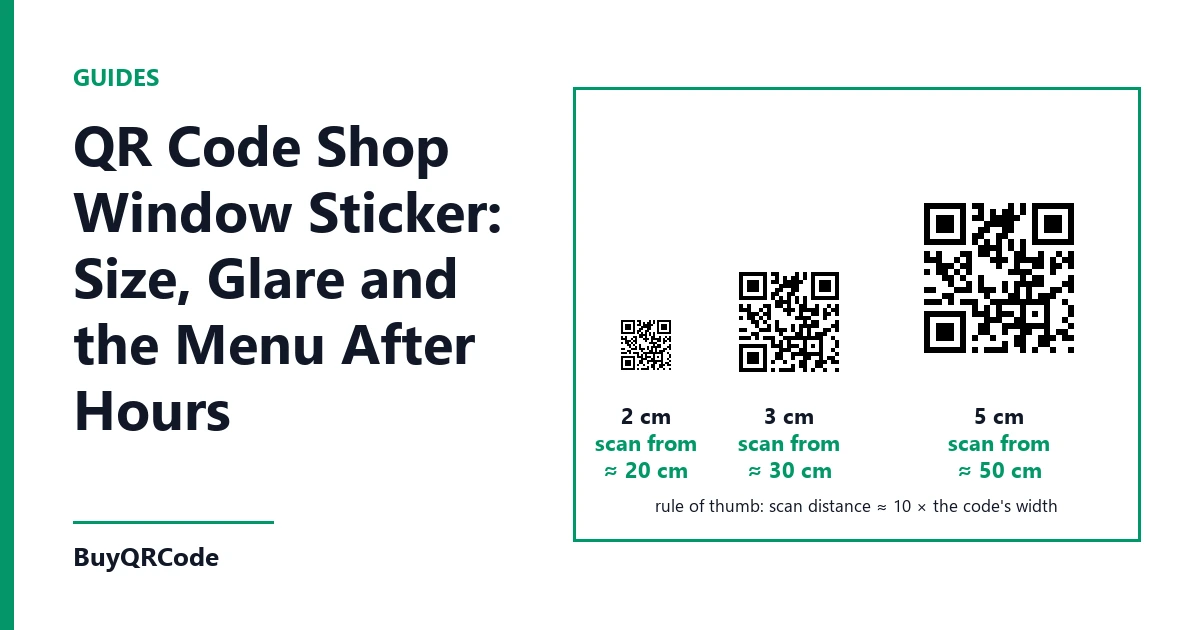
A simple rule works well. Make the code about one tenth as wide as the distance people scan it from. A person on the pavement usually stands 1.5 to 2 metres from the glass. So the code itself should be 150 to 200 mm across.
That is bigger than most people expect. A table code is often 50 to 80 mm wide, because the phone is held 30 to 60 cm away. Put that same small code on a window and people have to press their phone against the glass. Most will not bother.
At night, phone cameras are slower and less sharp. So go to the top of the range. A 200 mm code is a safe size for most shop fronts. If your door sits back behind a step, a ramp or a planter, and people stand 3 metres away, print it at 300 mm.
Leave a plain white margin around the code. Scanners need it to find the edges. On a 200 mm code, keep at least 20 mm of white on every side. Do not let a logo, a price sticker or the window frame cut into that margin.
Height matters as much as size. Centre the code between 1.3 and 1.5 metres above the pavement. That is the level where most people hold their phone without bending. Keep it off the door itself, because a door swings and moves the code out of view. Keep it clear of the display, where a stand or a cake tray can block it.
Beating glare on the glass
Glass reflects the sky, the street lights and the headlights of passing cars. A bright patch over the code can stop a scan.
Stick the code on the inside of the glass, facing out. Ask for an inside-glass sticker. The adhesive is on the printed face, so the code reads correctly through the window. The glass then protects it from rain, dust and scratches.
Choose a matte finish, not gloss. Gloss vinyl adds its own shine on top of the shine from the glass. Matte keeps the white part flat and even.
Before you fix the spot, go outside and stand where your customers stand. Look at the glass at noon, in the early evening and after dark. You will see where the street lamp or the sun lands as a bright patch. Move the code away from that patch, even by 30 cm. You cannot tilt a window, but you can choose where on it the code sits.
Some shop glass has a tint or a sun film. Film makes the white look grey from outside. If your glass has film, print the code one size larger and put a white backing card behind it.
Contrast after dark
The safest colours are a dark code on a light background. Black on white scans best. Dark blue or dark green on white also work. A light code on a dark background confuses many scanners. Red and orange codes fade badly behind glass.
If you want the code in your shop colours, keep the dark parts truly dark and the background truly light. You can see how a colour or a rounded shape looks before you buy on the colours and shapes preview.
Light from inside the shop causes a second problem. When the lights are on, they shine through thin vinyl from behind. The white parts turn grey and the contrast drops. Fix this with an opaque white backing behind the sticker. A piece of white foam board, cut 40 mm larger than the code, does the job.
When the lights are off, the code sits in the dark. Phone cameras need some light to read it. Leave one small lamp on a timer near the window. Or place the code where the street light already falls on the glass at night. Check it after dark with your own phone before you decide.
What it opens after hours
This is where a dynamic code pays for itself. A dynamic code opens a short web address that you can point to a new page at any time. The printed sticker never changes.
In the day, point it at your full menu. After closing, point it at a page with your opening hours at the top, then tomorrow's menu below. A person who scans at ten at night learns when you open and what they can come back for. That turns a closed shutter into a reason to return.
Keep the page light. Many people scan on weak mobile signal on a busy street. Put the hours and the menu as plain text on the page, not as a large PDF file. A page that opens in two or three seconds keeps the reader. A heavy file loses them before it loads.
If your menu changes with the season, change the page, not the sticker. The window stays clean and you save the cost of a reprint.
Test it before you stick it
Print the code at full size on plain paper first. Tape it inside the glass where you plan to put the sticker. Then test it from the pavement at 2 metres. Use at least three phones, and make one of them an older model. Test once in daylight and once after 8 pm.
If any phone takes more than a few seconds to read it, change one thing at a time. Go larger, move it out of the glare, or add the white backing. Then test again.
Fitting and care
Clean the glass with water and a drop of washing-up liquid. Dry it fully. Peel back the top edge of the backing first, line the sticker up, and press it down from the top with a plastic card. Work slowly so no bubbles sit over the code. A bubble across the squares can stop a scan.
An inside sticker lasts well, but strong sun fades vinyl over time. Look at it each season. If the black has turned brown or grey, replace it. Because the code is dynamic, the new sticker can open the same page as the old one.
Use code STARTUP10 for 10% off one order per account. It is valid until 31 December 2026 or for the first 100 uses on this site, whichever comes first.
To order the code for your window, choose the restaurant menu QR code and print it at the size this guide gives for your pavement.